
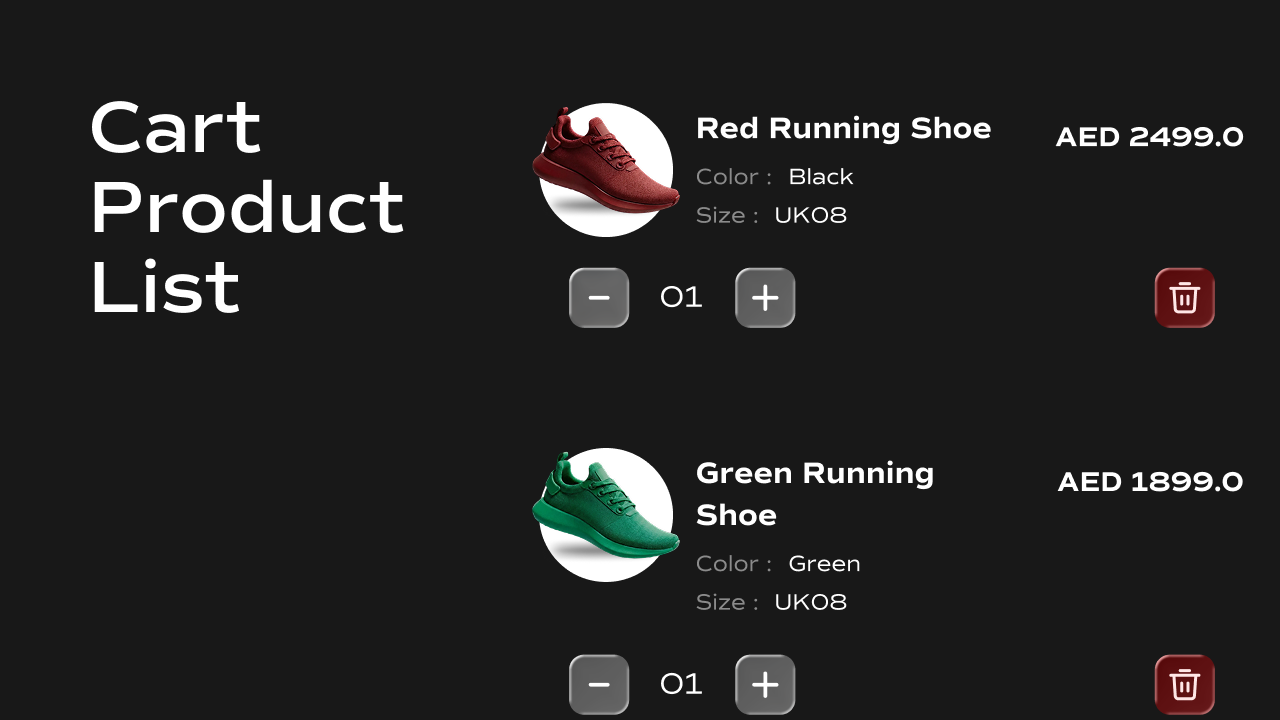
 A fully interactive cart item list component for Framer that reads from
 localStorage, renders each item with its image, title, variant options, price, and quantity controls, and supports increasing, decreasing, and removing items in real time.
What It Does
The Cart Product List renders all items currently in the cart as individual cards. Each card shows the product image, title, selected variant options, price, a quantity stepper (+/−), and a trash icon to remove the item. All interactions write directly back tolocalStorage and dispatch a cartUpdated event to keep other cart components in sync.
Key behaviors at a glance:
- **Reads cart from **
localStorage— on mount, reads thecartkey and renders one card per item. - Increase / decrease quantity — the
+and−buttons update the item’s quantity. The minimum quantity is1; the−button does not go below it. - Remove item — the trash icon removes the item from the cart entirely.
- **Writes back to **
localStorage— every quantity or delete action saves the updated cart back tolocalStorageand dispatches acartUpdatedevent so the Cart Item Counter, Cart State Controller, and any other cart components update instantly. - Preview-safe dummy data — when the cart is empty (e.g. on the Framer canvas), the component renders five sample items so the layout is always visible while designing.
- Updates in real time — listens for
cartUpdatedevents from other components so the list stays in sync if the cart is modified elsewhere on the page.
Property Controls
All controls are accessible in Framer’s right panel when the component is selected. They are grouped into four sections: Outer Container, Card, Image, and Content.Outer Container
Card
Controls the appearance of each cart item card.Image
Controls the product image on the left side of each card.Content
Controls all text, layout, and interactive elements in the right-hand content area of each card.Quantity
Controls the quantity stepper (− / value / +). Container — the pill or box wrapping all three elements:
Buttons — the individual
+ and − buttons:
Text — the quantity value displayed between the buttons:
Trash Icon
Controls the remove item button.Title
Price
Variant
Controls the variant option labels (e.g.Color: Black) shown under the product title.
Key — the option name (e.g. Color, Size):
Value — the option value (e.g.
Black, Large):
Spacing
Notes
- Each cart item in
localStoragemust includevariantId,title,price.amount,quantity,selectedOptions, and optionallyimage. Ifimageis missing, a placeholder image is shown. - Every interaction (increase, decrease, delete) dispatches a
cartUpdatedevent onwindowafter saving tolocalStorage, keeping the Cart Item Counter and Cart State Controller in sync automatically. - The minimum quantity per item is
1. Clicking−on a quantity of1does nothing. - When the cart is empty, five dummy preview items are rendered so the layout remains visible in Framer’s canvas while designing.